
 chao
7afb9dc6a9
update image
chao
7afb9dc6a9
update image
|
il y a 11 mois | |
|---|---|---|
| .vscode | il y a 2 ans | |
| block | il y a 2 ans | |
| blockly | il y a 11 mois | |
| docs | il y a 2 ans | |
| fonts | il y a 2 ans | |
| gif | il y a 2 ans | |
| icons | il y a 2 ans | |
| images | il y a 2 ans | |
| js_libs | il y a 2 ans | |
| libs | il y a 2 ans | |
| materialize | il y a 2 ans | |
| msg | il y a 1 an | |
| python | il y a 2 ans | |
| src | il y a 11 mois | |
| static | il y a 2 ans | |
| tests | il y a 2 ans | |
| ya-webadb | il y a 2 ans | |
| .DS_Store | il y a 2 ans | |
| .gitignore | il y a 2 ans | |
| .gitmodules | il y a 2 ans | |
| 20190114_python-blockly_plotting-temp-data.py | il y a 2 ans | |
| BLE.html | il y a 2 ans | |
| CocoPi.js | il y a 2 ans | |
| JSZip.js | il y a 2 ans | |
| LICENSE | il y a 2 ans | |
| README.md | il y a 2 ans | |
| ardublockly.css | il y a 2 ans | |
| ardublockly_blockly.js | il y a 2 ans | |
| ardublockly_lang.js | il y a 2 ans | |
| ardublockly_toolbox.js | il y a 2 ans | |
| ardublocklyserver_ajax.js | il y a 2 ans | |
| changelog.md | il y a 2 ans | |
| cocoblockly.css | il y a 2 ans | |
| crc32.js | il y a 2 ans | |
| data.json | il y a 2 ans | |
| engine_test.html | il y a 2 ans | |
| example_server.py | il y a 2 ans | |
| favicon.ico | il y a 2 ans | |
| index.css | il y a 2 ans | |
| index.html | il y a 1 an | |
| index.js | il y a 1 an | |
| instructor_api_documentation.py | il y a 2 ans | |
| makefile | il y a 2 ans | |
| manifest.webmanifest | il y a 2 ans | |
| md.html | il y a 2 ans | |
| merge.py | il y a 2 ans | |
| modernizr.css | il y a 2 ans | |
| package-lock.json | il y a 2 ans | |
| package.json | il y a 2 ans | |
| platform.js | il y a 2 ans | |
| replay.html | il y a 2 ans | |
| server.js | il y a 2 ans | |
| tcpip.html | il y a 2 ans | |
| toCNChecklist.md | il y a 2 ans | |
| todo.txt | il y a 2 ans | |
| toolbox_tree.css | il y a 2 ans | |
| train_cocopi.css | il y a 2 ans | |
| train_cocopi.html | il y a 2 ans | |
| train_cocopi.js | il y a 2 ans | |
| treeCompTest.html | il y a 2 ans | |
| uform.js | il y a 2 ans | |
| update.json | il y a 2 ans | |
| web.html | il y a 2 ans | |
| webble.js | il y a 2 ans |
README.md
corgis-blockly
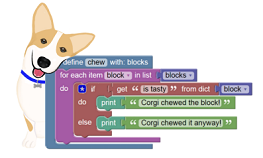
BlockPy is a web-based Python environment that lets you work with blocks, text, or both. Designed for Data Science and equipped with powerful tools like the State Explorer and Guided Feedback, the goal of BlockPy is to let you solve authentic, real-world problems.
The goal of BlockPy is to give you a gentle introduction to Python but eventually mature you into a more serious programming environment (such as Spyder or PyCharm). Long-term, we may support some game/animation design stuff that Scratch/Snap does, but that's not the real goal.
The BlockPy project is aimed at solving some hard technical problems: having a block-based environment for a dynamic language can be tricky - are a given pair of square brackets representing list indexing or dictionary indexing? Our goal is to use advanced program analysis techniques to provide excellent support to learners.
Overview
The core architecture of BlockPy is a synthesis of:
- Blockly: a visual library for manipulating a block canvas that can generate equivalent textual code in a variety of languages
- Skulpt: an in-browser Python-to-JavaScript compiler/intepreter, that aims to emulate the full language with precision if not speed.
By combining these two technologies, we end up with a powerful system for writing Python code quickly. Everything is meant to run locally in the client, so there's no complexity of sandboxing students' code on the server.
The major innovations are:
- PythonToBlocks: by parsing the AST generated by Skulpt, we can build equivalent Blockly code, effectively allowing round-trips between text and blocks.
- CORGIS Datsets: new blocks access real-world datasets (although currently these are only cached versions, for performance reasons).
- Interactive Guided Problems: Problem text is given to students, along with teacher provided code that can do analysis on the students' code and make suggestions (e.g., observing that they haven't printed anything yet).
- Data Explorer: The data explorer allows users to walk through their code.
Installation
First, clone it locally. This could take a little while.
> git clone https://github.com/RealTimeWeb/blockpy.git
You'll need to build Skulpt and Blockly. Both of these depend on the Closure Compiler, so you'll need to put that in the empty closure-library folder. You can follow the Blockly instructions here , but the gist will be:
> wget https://github.com/google/closure-library/zipball/master -O closure.zip
> unzip closure.zip
CD into the new blockpy directory
> cd blockpy/
And add the relevant subtree information to your .git/config:
> vi .git/config
Replace the contents of that file with the information found here: http://pastebin.com/raw/QWpJjgU3 (TODO: show the actual commands used to set this)
Next, you'll need to build Blockly:
> cp blockly/msg/en.js en.js
> cd blockly
> python build.py
> cd ..
> mv en.js blockly/msg/en.js
And then you'll build Skulpt:
> cd skulpt
> python skulpt.py dist
> cd ..
If you are on windows, you may encounter the message "No gzip executable", you can safely ignore this.
And now you should be able to try out the example file!
> start blockpy_new.html
The server has its own requirements.txt and uses a python manage.py runserver
If you make edits to either Blockly or Skulpt, you'll need to rerun their build commands. Simiarly, if you edit src/interface.html than you'll need to rebuild it:
> python build.py
Otherwise, you should be able to edit the src/*.js files freely. To get a sense of the dependencies, check out the blockpy_new.html file and then the src/main.js file. These should be good starting points.
Commands
Both Blockly and Skulpt are subtrees.
Push changes to the subtrees' repos:
> git subtree push --prefix=skulpt/ --squash skulpt master
> git subtree push --prefix=blockly/ --squash blockly master
> git subtree push --prefix=server/ --squash server master
> git subtree push --prefix=server/static/blockly-games --squash blockly_games master
Pull changes from upstream repos (e.g., official Blockly and Skulpt, our production server):
> git subtree pull --prefix=skulpt --squash skulpt_upstream master
> git subtree pull --prefix=blockly --squash blockly_upstream master
> git subtree pull --prefix=server --squash server master
> git subtree pull --prefix=server/static/blockly-games --squash blockly_games master
Note: if you get an error about a "fatal entry", make sure you don't have a trailing slash on the prefix!